
Open-source 2D Puppet Modelling
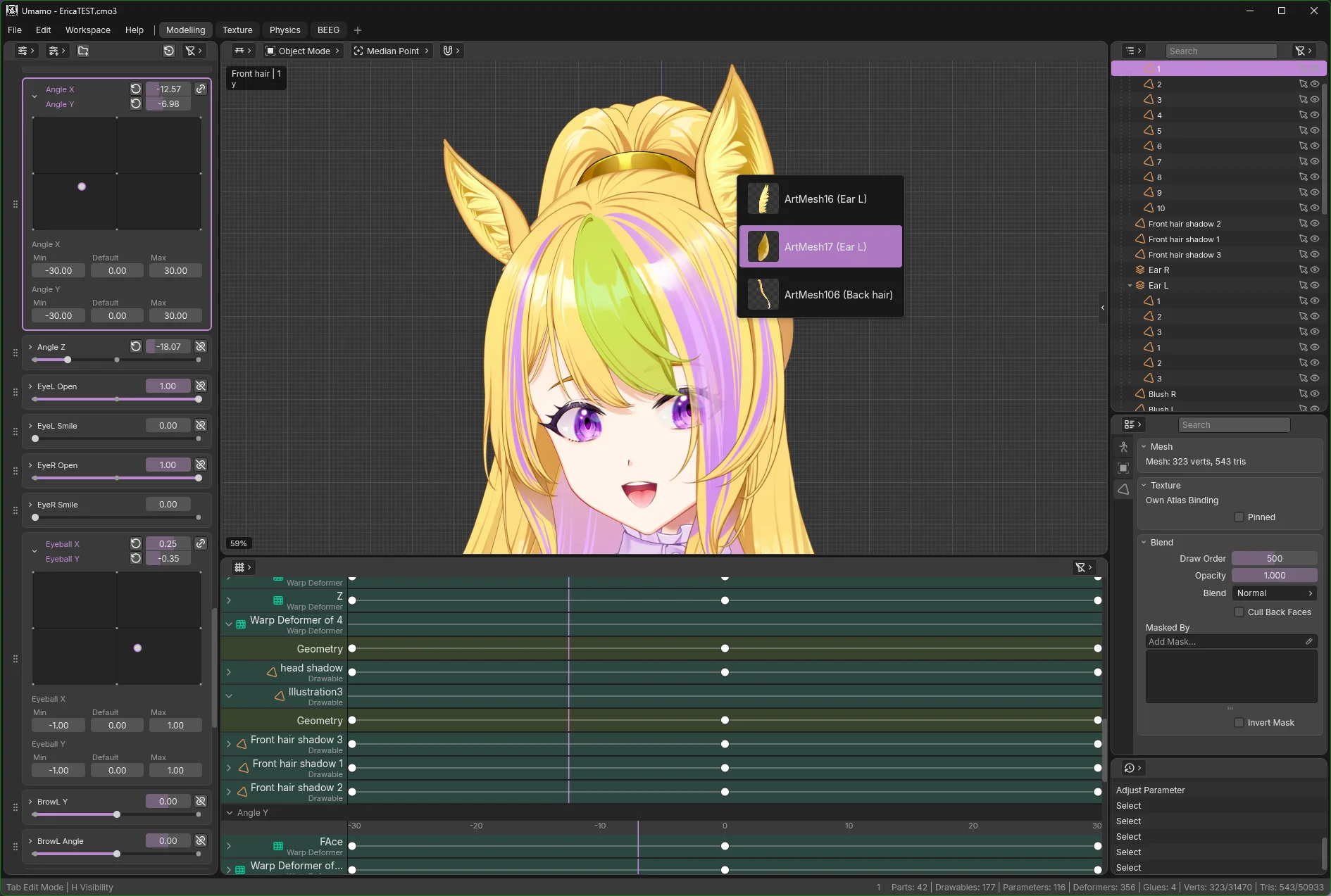
Umamo is a free, cross-platform modelling editor for 2D puppet animation with pen and touch support. It reads and writes Live2D Cubism .cmo3 and .moc3 files. Currently in early development preview to gather user feedback. Join our Discord to participate!
Windows, MacOS, and Linux · Free and Open Source
Download
The current build is Umamo (see releases), published .
Pick your platform from the table.
All platforms
| Platform | Installer Recommended | Portable Unpack and run | Java 21+ .jar |
|---|---|---|---|
| See the GitHub releases page for every build. | |||
Verify your download against SHA256SUMS.txt(signature, release key) · Release notes · All releases · Source code
Installers and portable builds bundle their own Java runtime. The .jar builds need Java 21 or newer and run anywhere Java does. Intel Macs use the .jar for now.
Installing
- Download the
.msiinstaller and run it. The installer installs for your local user only and will exit without confirmation after it is finished. - SmartScreen will say “Windows protected your PC”. Choose More info, then Run anyway.
Rather not install? Download the .zip instead, extract it anywhere you like, and run Umamo.exe from the extracted folder. SmartScreen will warn about it the same way.
Apple Silicon
- Download the
.dmg, open it, and drag Umamo into Applications. - Start Umamo from Applications.
Intel
- Install Java 21 or newer if you don't have it.
-
Download the Intel
.jarand double-click it, or run it from Terminal:java -XX:MaxRAMPercentage=50 -jar umamo-macos-x64-<version>.jar
Debian 12+, Ubuntu 22.04+, Linux Mint 21+
Download the .deb for your architecture and install it:
sudo apt install ./umamo-linux-x64-<version>.debFedora and other RPM distributions
The .rpm is signed. Import the Umamo release key once, then install it with signature checking turned on:
sudo rpm --import https://umamo.org/keys/umamo-signing-key.asc
sudo dnf install --setopt=localpkg_gpgcheck=1 ./umamo-linux-x64-<version>.rpm
Release key fingerprint: 6775 4C0D C587 4327 0D57 4066 F549 9AE5 C80A 0F1C
Any other distribution
Unpack the .tar.gz and run the launcher:
tar xzf umamo-linux-x64-<version>.tar.gz
umamo/bin/umamo
That's it. Linux doesn't restrict you from running any application that you wish to run on your computer.
System Requirements
| Minimum | Recommended | Notes | |
|---|---|---|---|
| Memory | 16 GB | 32 GB+ | 8 GB has been tested, but requires raising the Java heap space setting. Heavy models with many layers and texture atlases may run out of memory on systems below 16GB. |
| CPU | 4 cores | - | A 2014 Macbook Pro with an Intel i7 4th Gen, with performance mode turned on, had barely acceptable performance. If your system is newer than this you will probably be fine. |
| Operating system |
Windows 10/11
MacOS 11+ (Intel) - Ubuntu 22 |
-
MacOS 15+ (ARM64) Fedora 44 Ubuntu 26 |
Tested platforms. For older operating systems, you may need to use the JAR based distribution. |
Built for 2D Puppet Work
One shared codebase, a modern UI, and works with your existing CMO3 and MOC3 puppets.
Runs on any OS
Windows, MacOS and Linux today, on x64 and arm64. Android and iPadOS are on the development roadmap.
Pen Displays and Tablets
Made with pen displays in mind by building the interface around pen input.
Cubism Editor Interopability
Opens and saves .cmo3 projects byte-compatible with the official editor. Tested with Cubism Editor 4.2 to 5.4.
MOC3 In and Out
Import and export runtime distribution .moc3 along with their sidecars.
Industry Standard Artwork Format Support
Bring layered files straight from Krita(.kra), Photoshop(.psd), and Clip Studio Paint(.clip).
A modern, resolution-independent UI
Built with Kotlin and Compose Multiplatform, with a command palette, pie menus, and high resolution display support.
File formats
| Format | Read | Write | Notes |
|---|---|---|---|
.uma |
Yes | Yes | Native UMA Model |
.cmo3 |
Yes | Yes | Cubism Editor model, supports up to Cubism 5.4. |
.moc3 |
Yes | Yes | Cubism runtime distribution model, supports up to Cubism 5.4. |
.kra |
Yes | — | Krita |
.psd |
Yes | — | Photoshop |
.clip |
Partial | — | Clip Studio Paint; has known blending issues. |
Found a problem with a format? Open an issue with a sample file.
Screenshots
Click on any image to enlarge it.
